OneLibro Architecture
This document describes the system architecture, design patterns, and technical decisions behind OneLibro.
Table of Contents
- System Overview
- Technology Stack
- Application Architecture
- Data Flow
- Security Architecture
- Design Patterns
System Overview
OneLibro is a Next.js 15 application with three distinct subdomains, each serving a specific purpose:
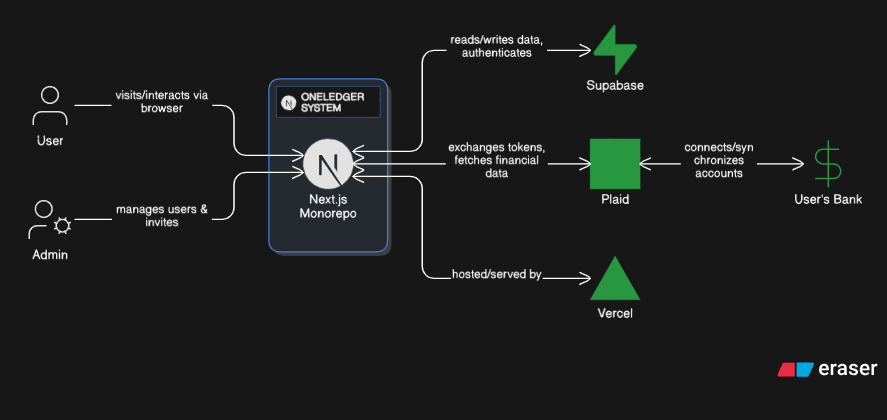
┌─────────────────────────────────────────────────────────┐
│                     OneLibro System                     │
├─────────────────────────────────────────────────────────┤
│                                                          │
│  ┌────────────────┐  ┌──────────────┐  ┌────────────┐  │
│  │  Portfolio      │  │  Finance App │  │  Admin     │  │
│  │  (Main Site)   │  │  (OneLibro) │  │  Dashboard │  │
│  └────────────────┘  └──────────────┘  └────────────┘  │
│        │                    │                  │        │
│        └────────────────────┴──────────────────┘        │
│                           │                             │
│                    ┌──────┴───────┐                     │
│                    │   Next.js 15  │                    │
│                    │   (App Router)│                    │
│                    └──────┬───────┘                     │
│                           │                             │
│            ┌──────────────┼──────────────┐              │
│            │              │              │              │
│      ┌─────┴─────┐  ┌────┴────┐  ┌──────┴──────┐       │
│      │ Supabase  │  │  Plaid  │  │   Vercel    │       │
│      │ (Database)│  │  (Bank) │  │ (Hosting)   │       │
│      └───────────┘  └─────────┘  └─────────────┘       │
│                                                          │
└─────────────────────────────────────────────────────────┘
Subdomain Routing
The application uses Next.js rewrites to handle subdomain routing:
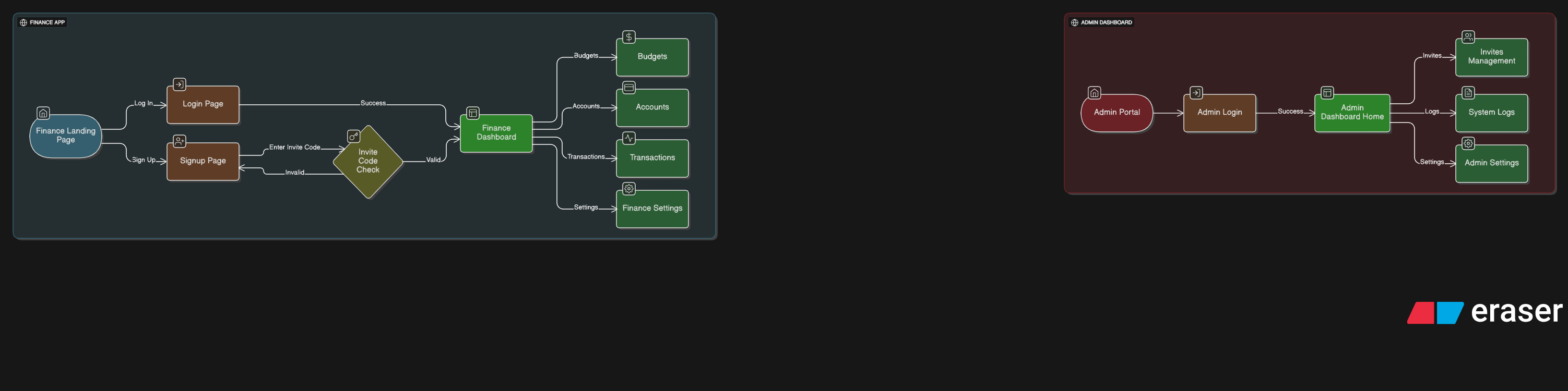
| Domain | Path | Purpose |
|---|---|---|
yatheeshnagella.com | /app/page.jsx | Personal portfolio |
finance.yatheeshnagella.com | /app/finance/* | Finance application |
admin.yatheeshnagella.com | /app/admin/* | Admin dashboard |
Implementation (next.config.ts):
async rewrites() {
  return {
    beforeFiles: [
      // Admin subdomain
      {
        source: '/:path*',
        has: [{ type: 'host', value: 'admin.yatheeshnagella.com' }],
        destination: '/admin/:path*',
      },
      // Finance subdomain
      {
        source: '/:path*',
        has: [{ type: 'host', value: 'finance.yatheeshnagella.com' }],
        destination: '/finance/:path*',
      },
    ],
  };
}
Technology Stack
Frontend Stack
React 19.1.0
├── Next.js 15.5.4 (App Router + Turbopack)
├── TypeScript 5.x
├── Tailwind CSS v4
└── Component Libraries
    ├── Recharts (charts/visualizations)
    ├── Lucide React (icons)
    ├── react-hot-toast (notifications)
    └── react-plaid-link (Plaid integration)
Backend Stack
Next.js API Routes (Serverless Functions)
├── Supabase
│   ├── PostgreSQL (database)
│   ├── Authentication
│   ├── Row Level Security (RLS)
│   └── Real-time subscriptions
├── Plaid API
│   ├── Link (bank connection)
│   ├── Transactions API
│   ├── Accounts API
│   └── Webhooks
└── Security Libraries
    ├── bcryptjs (password hashing)
    ├── otplib (TOTP 2FA)
    └── crypto (AES-256-CBC encryption)
Data Management
State Management
├── React Context API
│   ├── AuthContext (user authentication)
│   └── FinanceThemeContext (theme management)
├── SWR (data fetching & caching)
│   ├── useAccounts hook
│   ├── useTransactions hook
│   └── Automatic revalidation
└── Local State (useState, useReducer)
Application Architecture
Layered Architecture
┌─────────────────────────────────────────────────┐
│              Presentation Layer                  │
│  (React Components, Pages, UI)                   │
│  - app/finance/*, app/admin/*                    │
│  - components/finance/*                          │
└──────────────────┬──────────────────────────────┘
                   │
┌──────────────────┴──────────────────────────────┐
│              Business Logic Layer                │
│  (Hooks, Contexts, State Management)             │
│  - contexts/*                                    │
│  - Custom hooks (useAuth, useAccounts, etc.)     │
└──────────────────┬──────────────────────────────┘
                   │
┌──────────────────┴──────────────────────────────┐
│              Service Layer                       │
│  (API Routes, Helper Functions)                  │
│  - app/api/*                                     │
│  - lib/supabase.ts, lib/plaid.ts                 │
└──────────────────┬──────────────────────────────┘
                   │
┌──────────────────┴──────────────────────────────┐
│              Data Layer                          │
│  (Database, External APIs)                       │
│  - Supabase (PostgreSQL + RLS)                   │
│  - Plaid API                                     │
└─────────────────────────────────────────────────┘
File Structure
yatheesh-portfolio/
├── app/                          # Next.js App Router
│   ├── finance/                  # Finance app pages
│   │   ├── page.tsx             # Dashboard (main)
│   │   ├── accounts/            # Account management
│   │   ├── transactions/        # Transaction history
│   │   ├── budgets/             # Budget management
│   │   ├── login/               # Auth page
│   │   └── layout.tsx           # Finance layout (AuthProvider)
│   ├── admin/                   # Admin dashboard
│   │   ├── page.tsx            # Admin home
│   │   ├── users/              # User management
│   │   ├── invites/            # Invite management
│   │   ├── logs/               # Audit logs
│   │   ├── login/              # Admin auth
│   │   └── layout.tsx          # Admin layout
│   └── api/                    # API routes
│       ├── plaid/              # Plaid integration
│       ├── admin/              # Admin APIs
│       └── transactions/       # Transaction CRUD
├── components/                  # React components
│   └── finance/                # Finance-specific components
│       ├── PlaidLink.tsx       # Plaid Link button
│       ├── DashboardCard.tsx   # Stat cards
│       ├── SpendingChart.tsx   # Recharts visualization
│       └── ProtectedRoute.tsx  # Auth wrapper
├── contexts/                   # React Context providers
│   ├── AuthContext.tsx         # User authentication
│   └── FinanceThemeContext.tsx # Theme management
├── lib/                        # Utility libraries
│   ├── supabase.ts            # Supabase helpers
│   ├── plaid.ts               # Plaid integration
│   ├── admin-auth.ts          # Admin authentication
│   ├── env.ts                 # Environment validation
│   └── utils.ts               # Generic utilities
├── types/                      # TypeScript definitions
│   ├── supabase.ts            # Generated from Supabase
│   └── database.types.ts      # Custom database types
└── supabase/                  # Database schema
    └── migrations/            # SQL migration files
Data Flow
User Authentication Flow
┌─────────┐
│  User   │
└────┬────┘
     │
     │ 1. Enter email/password
     ▼
┌────────────────┐
│  Login Page    │
│  /finance/login│
└────┬───────────┘
     │
     │ 2. Call signIn()
     ▼
┌────────────────────┐
│  lib/supabase.ts   │
│  signIn(email, pwd)│
└────┬───────────────┘
     │
     │ 3. Authenticate
     ▼
┌────────────────────┐
│  Supabase Auth     │
│  signInWithPassword│
└────┬───────────────┘
     │
     │ 4. Update last_login
     ▼
┌────────────────────┐
│  users table       │
│  UPDATE last_login │
└────┬───────────────┘
     │
     │ 5. Set session
     ▼
┌────────────────────┐
│  AuthContext       │
│  setUser(userData) │
└────┬───────────────┘
     │
     │ 6. Redirect
     ▼
┌────────────────────┐
│  Dashboard         │
│  /finance          │
└────────────────────┘
Plaid Bank Connection Flow
┌─────────┐
│  User   │
└────┬────┘
     │ 1. Click "Connect Bank"
     ▼
┌──────────────────────┐
│  PlaidLink Component │
└────┬─────────────────┘
     │
     │ 2. Request link token
     ▼
┌─────────────────────────────┐
│  POST /api/plaid/           │
│  create-link-token          │
└────┬────────────────────────┘
     │
     │ 3. Create link token
     ▼
┌─────────────────────────────┐
│  Plaid API                  │
│  linkTokenCreate()          │
└────┬────────────────────────┘
     │
     │ 4. Return link_token
     ▼
┌─────────────────────────────┐
│  PlaidLink Component        │
│  usePlaidLink({ token })    │
└────┬────────────────────────┘
     │
     │ 5. User selects bank
     │    & authorizes
     ▼
┌─────────────────────────────┐
│  Plaid Link UI              │
│  (Modal)                    │
└────┬────────────────────────┘
     │
     │ 6. Return public_token
     ▼
┌─────────────────────────────┐
│  onSuccess callback         │
└────┬────────────────────────┘
     │
     │ 7. Exchange token
     ▼
┌─────────────────────────────┐
│  POST /api/plaid/           │
│  exchange-token             │
└────┬────────────────────────┘
     │
     │ 8. Exchange for access_token
     ▼
┌─────────────────────────────┐
│  Plaid API                  │
│  itemPublicTokenExchange()  │
└────┬────────────────────────┘
     │
     │ 9. Encrypt access_token
     ▼
┌─────────────────────────────┐
│  lib/plaid.ts               │
│  encryptAccessToken()       │
└────┬────────────────────────┘
     │
     │ 10. Store in database
     ▼
┌─────────────────────────────┐
│  plaid_items table          │
│  INSERT encrypted_token     │
└────┬────────────────────────┘
     │
     │ 11. Fetch accounts
     ▼
┌─────────────────────────────┐
│  Plaid API                  │
│  accountsGet()              │
└────┬────────────────────────┘
     │
     │ 12. Store accounts
     ▼
┌─────────────────────────────┐
│  accounts table             │
│  INSERT multiple rows       │
└────┬────────────────────────┘
     │
     │ 13. Refresh UI
     ▼
┌─────────────────────────────┐
│  Dashboard                  │
│  SWR revalidate             │
└─────────────────────────────┘
Transaction Sync Flow
┌──────────────┐
│  Plaid       │
│  Webhook     │
└──────┬───────┘
       │
       │ TRANSACTIONS_UPDATE
       ▼
┌─────────────────────────┐
│  POST /api/plaid/webhook│
└──────┬──────────────────┘
       │
       │ Verify webhook signature
       ▼
┌─────────────────────────────┐
│  lib/plaid.ts               │
│  verifyWebhookSignature()   │
└──────┬──────────────────────┘
       │
       │ Trigger sync (background)
       ▼
┌─────────────────────────────┐
│  POST /api/plaid/           │
│  sync-transactions          │
└──────┬──────────────────────┘
       │
       │ Get encrypted access_token
       ▼
┌─────────────────────────────┐
│  plaid_items table          │
│  SELECT access_token        │
└──────┬──────────────────────┘
       │
       │ Decrypt token
       ▼
┌─────────────────────────────┐
│  lib/plaid.ts               │
│  decryptAccessToken()       │
└──────┬──────────────────────┘
       │
       │ Fetch transactions (cursor-based)
       ▼
┌─────────────────────────────┐
│  Plaid API                  │
│  transactionsSync()         │
└──────┬──────────────────────┘
       │
       │ Process added/modified
       ▼
┌─────────────────────────────┐
│  transactions table         │
│  UPSERT transactions        │
└──────┬──────────────────────┘
       │
       │ Update balances
       ▼
┌─────────────────────────────┐
│  accounts table             │
│  UPDATE current_balance     │
└──────┬──────────────────────┘
       │
       │ Save cursor for next sync
       ▼
┌─────────────────────────────┐
│  plaid_items table          │
│  UPDATE cursor              │
└─────────────────────────────┘
Security Architecture
Authentication Layers
┌──────────────────────────────────────┐
│        Client (Browser)              │
└──────────────┬───────────────────────┘
               │
       ┌───────┴────────┐
       │                │
┌──────▼──────┐  ┌──────▼──────┐
│   Finance   │  │    Admin    │
│   Auth      │  │    Auth     │
└──────┬──────┘  └──────┬──────┘
       │                │
       │                │
┌──────▼──────┐  ┌──────▼──────────┐
│  Supabase   │  │  Custom Admin   │
│  Auth       │  │  Auth + TOTP    │
│  (JWT)      │  │  (Session Token)│
└──────┬──────┘  └──────┬──────────┘
       │                │
       └────────┬───────┘
                │
       ┌────────▼────────┐
       │   Row Level     │
       │   Security      │
       │   (RLS)         │
       └─────────────────┘
Data Encryption
Plaid Access Tokens (AES-256-CBC):
// Encryption
const iv = crypto.randomBytes(16);
const cipher = crypto.createCipheriv('aes-256-cbc', key, iv);
let encrypted = cipher.update(token, 'utf8', 'hex');
encrypted += cipher.final('hex');
return iv.toString('hex') + ':' + encrypted;

// Decryption
const [ivHex, encryptedText] = encryptedToken.split(':');
const decipher = crypto.createDecipheriv('aes-256-cbc', key, Buffer.from(ivHex, 'hex'));
let decrypted = decipher.update(encryptedText, 'hex', 'utf8');
decrypted += decipher.final('utf8');
Row Level Security (RLS) Policies
Users can only access their own data:
-- Example: transactions table
CREATE POLICY "Users can view own transactions"
ON transactions FOR SELECT
USING (auth.uid() = user_id);

CREATE POLICY "Users can insert own transactions"
ON transactions FOR INSERT
WITH CHECK (auth.uid() = user_id);
Design Patterns
1. Context + Custom Hooks Pattern
AuthContext provides authentication state globally:
// Context Provider
export function AuthProvider({ children }) {
  const [user, setUser] = useState<User | null>(null);
  const [loading, setLoading] = useState(true);

  // ... auth logic

  return (
    <AuthContext.Provider value={{ user, loading, signIn, signOut }}>
      {children}
    </AuthContext.Provider>
  );
}

// Custom Hook
export function useAuth() {
  const context = useContext(AuthContext);
  if (!context) throw new Error('useAuth must be used within AuthProvider');
  return context;
}

// Protected Route Hook
export function useRequireAuth() {
  const { user, loading } = useAuth();
  const router = useRouter();

  useEffect(() => {
    if (!loading && !user) {
      router.push('/finance/login');
    }
  }, [user, loading, router]);

  return { user, loading };
}
2. SWR Data Fetching Pattern
Automatic caching and revalidation:
// Custom SWR hook
export function useAccounts() {
  const { user } = useAuth();

  const { data, error, mutate } = useSWR(
    user ? `/api/accounts/${user.id}` : null,
    fetcher,
    {
      revalidateOnFocus: true,
      revalidateOnReconnect: true,
      dedupingInterval: 5000,
    }
  );

  return {
    accounts: data,
    loading: !error && !data,
    error,
    refresh: mutate,
  };
}
3. Helper Function Pattern
Centralized database queries in lib/supabase.ts:
// Good: Use helper function
import { getUserAccounts } from '@/lib/supabase';
const accounts = await getUserAccounts(userId);

// Avoid: Direct Supabase query in components
const { data } = await supabase.from('accounts').select('*');
Benefits:
- Type safety
- Reusability
- Easier testing
- Consistent error handling
4. Server-Side API Routes Pattern
Secure server-side operations:
// app/api/plaid/exchange-token/route.ts
export async function POST(request: Request) {
  // 1. Verify authentication
  const session = await getServerSession();
  if (!session) {
    return NextResponse.json({ error: 'Unauthorized' }, { status: 401 });
  }

  // 2. Parse and validate request
  const { publicToken, userId } = await request.json();

  // 3. Call external API (Plaid)
  const response = await plaidClient.itemPublicTokenExchange({ public_token: publicToken });

  // 4. Encrypt sensitive data
  const encryptedToken = encryptAccessToken(response.access_token);

  // 5. Store in database
  await supabase.from('plaid_items').insert({ access_token: encryptedToken, user_id: userId });

  // 6. Return success
  return NextResponse.json({ success: true });
}
5. Type-Safe Environment Variables
Validation at startup (lib/env.ts):
const envSchema = z.object({
  supabase: z.object({
    url: z.string().url(),
    anonKey: z.string(),
    serviceRoleKey: z.string(),
  }),
  plaid: z.object({
    clientId: z.string(),
    secret: z.string(),
    env: z.enum(['sandbox', 'development', 'production']),
  }),
  encryption: z.object({
    key: z.string().length(64),
  }),
});

export const env = envSchema.parse({
  supabase: {
    url: process.env.NEXT_PUBLIC_SUPABASE_URL,
    anonKey: process.env.NEXT_PUBLIC_SUPABASE_ANON_KEY,
    serviceRoleKey: process.env.SUPABASE_SERVICE_ROLE_KEY,
  },
  // ... more config
});
Performance Optimizations
1. Query Optimization
Single query with nested relations (lib/supabase.ts:256-292):
// ✅ Optimized: Single query with nested relations
const { data } = await supabase
  .from('accounts')
  .select(`
    *,
    plaid_items (
      institution_name,
      status
    )
  `)
  .eq('user_id', userId);

// ❌ Unoptimized: Multiple queries
const accounts = await supabase.from('accounts').select('*');
for (const account of accounts) {
  const item = await supabase.from('plaid_items').select('*').eq('id', account.plaid_item_id);
}
2. SWR Caching
Reduces unnecessary API calls:
<FinanceSWRProvider>
  {/* All child components share SWR cache */}
  <Dashboard />
</FinanceSWRProvider>
3. Turbopack Build
Faster builds and hot reload:
{
  "scripts": {
    "dev": "next dev --turbopack",
    "build": "next build --turbopack"
  }
}
Scalability Considerations
Database Indexing
-- High-frequency query indexes
CREATE INDEX idx_transactions_user_date ON transactions(user_id, transaction_date DESC);
CREATE INDEX idx_accounts_user ON accounts(user_id);
CREATE INDEX idx_plaid_items_user ON plaid_items(user_id);
Cursor-Based Pagination
// Plaid transactions sync uses cursor
const response = await plaidClient.transactionsSync({
  access_token: accessToken,
  cursor: lastCursor || '',
});

// Save cursor for next sync
await updateItemCursor(itemId, response.next_cursor);
Serverless Architecture
- Next.js API Routes scale automatically on Vercel
- Supabase handles database scaling
- No persistent server state required
Next Steps:
- Read Database Schema for database details
- Review Authentication for auth implementation
- Check API Reference for API documentation